MCP Gateway — protect any MCP server (no code changes)
Put Shield in front of an existing MCP server — third-party, vendor-built,
legacy, or your own — without changing a line of it. Your agents connect to
the gateway instead of the server; every tools/call and resources/read is
enforced (RBAC → input → forward → output DLP) before it reaches the real server.
One gateway deployment fronts many servers by config.
Use this when you don’t control the server. If you do, the embedded pattern (examples/mcp_server) is simpler.
How it works
Two separate connections — this is the thing to get right:
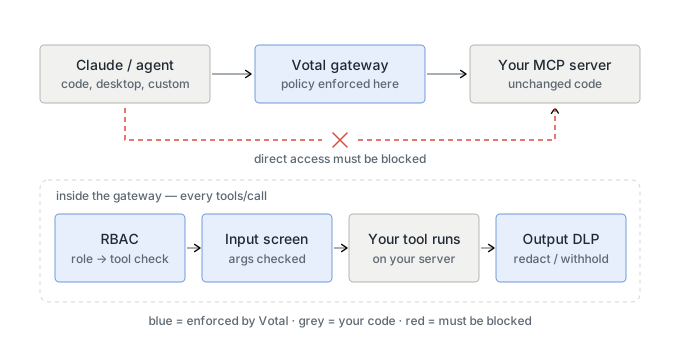
- Leg 1 (agent → gateway): the gateway is your public endpoint; agents point at
https://<shield>/gateway/<route>/mcp. - Leg 2 (gateway → upstream): the gateway makes an outbound call to your server. Your server just has to be reachable from the gateway — and, for real protection, reachable only from the gateway (see Non-bypassability).
Everything is served by the Shield data plane and authenticated with your
tenant API key (X-API-Key) — no admin key involved.
Integrate in 4 steps
Prerequisites: a Shield tenant + API key (X-API-Key), and an MCP server that
speaks http (streamable) / sse / stdio.
export SHIELD=https://<your-shield-data-plane>     # e.g. https://api.guardrails.votal.ai
export KEY=<your-tenant-api-key>
export ROUTE=myserver
1. Register your agent + role→tool policy (so RBAC has something to enforce)
Enforcement keys off tool names, so tell Shield which role may call which tool. Use your upstream’s real tool names.
curl -s -X POST "$SHIELD/v1/agents/registry" -H "X-API-Key: $KEY" -H 'Content-Type: application/json' \
  -d '{
    "agent_id": "my-agent",
    "tools": ["search", "get_record", "delete_record"],
    "role_permissions": {
      "reader": ["search", "get_record"],
      "admin":  ["search", "get_record", "delete_record"]
    }
  }'
(You can also manage this + per-tool data policies in the tenant portal.)
2. Configure the route → your upstream
curl -s -X PUT "$SHIELD/v1/tenant/me/mcp-gateway/upstreams/$ROUTE" \
  -H "X-API-Key: $KEY" -H 'Content-Type: application/json' \
  -d '{
    "transport": "http",
    "url": "https://your-mcp-server/mcp",
    "enforcement_backend": "inprocess",
    "isolation_ack": true
  }'
transport:http(streamable-HTTP) /sse/stdio(command+args+env).- Upstream creds →
headers/env(redacted on read). urlmust be reachable from the gateway (notlocalhostif the gateway is remote — see Reachability).
3. Point your agents at the gateway
https://<shield>/gateway/myserver/mcp
Speaks MCP JSON-RPC. Identity comes from the connection, never from tool args:
| Header | Meaning |
|---|---|
X-API-Key |
your tenant key (which tenant’s policy) |
X-Agent-Key |
the registered agent id (my-agent) |
X-User-Role |
the caller’s role (reader / admin / …) |
GW="$SHIELD/gateway/$ROUTE/mcp"
H=(-H "X-API-Key: $KEY" -H "X-Agent-Key: my-agent" -H "X-User-Role: reader" -H 'Content-Type: application/json')

curl -s -X POST "$GW" "${H[@]}" -d '{"jsonrpc":"2.0","id":1,"method":"tools/list"}'
# reader may not delete -> blocked, never reaches the upstream:
curl -s -X POST "$GW" "${H[@]}" -d '{"jsonrpc":"2.0","id":2,"method":"tools/call","params":{"name":"delete_record","arguments":{"id":"1"}}}'
For MCP clients (Claude Desktop/Code, etc.), point a remote/streamable-HTTP connector at that URL and set the identity headers.
4. Lock the upstream down (non-bypassable)
The gateway only enforces what flows through it. If agents can reach your
upstream directly, they can skip Shield. So make the upstream reachable only
from the gateway — private network / firewall / mTLS, or a gateway-only bearer
token in the route headers that the upstream checks — then keep
isolation_ack: true (your attestation of this). A route with
isolation_ack: false starts in a warned, not-truly-protected state.
See mcp-runtime-enforcement.md.
Connect it to Claude
Point Claude at the gateway URL (not the raw upstream) with the identity headers.
Claude Code (native header support):
claude mcp add --transport http shield-gateway \
  https://<shield>/gateway/<route>/mcp \
  --header "X-API-Key: <tenant-key>" \
  --header "X-Agent-Key: <agent-id>" \
  --header "X-User-Role: admin"
Add --scope user to share it across projects (default scope is local). Manage
with claude mcp list / claude mcp get shield-gateway / claude mcp remove
shield-gateway. (The sse transport is deprecated — use http.)
Claude Desktop — edit claude_desktop_config.json (macOS:
~/Library/Application Support/Claude/).
Use the mcp-remote bridge. Current Desktop builds accept only stdio entries
(command / args) in this file and silently skip "type": "http" ones, so the
bridge is the reliable form. It runs a local stdio process that proxies to the
gateway URL:
{
  "mcpServers": {
    "shield-gateway": {
      "command": "npx",
      "args": ["-y", "mcp-remote", "https://<shield>/gateway/<route>/mcp",
               "--header", "X-API-Key:${SHIELD_KEY}",
               "--header", "X-Agent-Key:<agent-id>",
               "--header", "X-User-Role:admin"],
      "env": { "SHIELD_KEY": "<tenant-key>" }
    }
  }
}
Requires Node (for npx). First launch is slower while mcp-remote downloads.
mcp-remote probes for OAuth first, finds none, then falls back to these headers;
that is expected. Keep the key in env and reference it as ${SHIELD_KEY} rather
than inlining it, which also avoids a Windows quoting bug with spaces in header
values (note X-API-Key:${SHIELD_KEY} has no space after the colon).
Quit Desktop before editing. It rewrites this file on exit, so edits made while
it is running are overwritten. Quote the path, since it contains a space:
vi "$HOME/Library/Application Support/Claude/claude_desktop_config.json".
Unquoted, the shell splits it into two paths and your edit lands in a stray file.
Then start Desktop; the server appears under the connectors (🔌) menu.
If you see “some MCP servers could not be loaded”, check
~/Library/Logs/Claude/main.log for Skipped invalid MCP server config entries,
which means the entry format was rejected (usually a "type": "http" entry). Each
server also gets its own ~/Library/Logs/Claude/mcp-server-<name>.log; a healthy
one shows Server started and connected successfully followed by a tools/list
result.
Claude.ai (web) custom connectors expect OAuth, not static headers — use Claude Code or Desktop for API-key/header auth.
Notes:
- Role is fixed per connector — whatever
X-User-Roleyou set applies to every call. Add two connectors (e.g.shield-admin,shield-reader) with different roles to see allow-vs-block live. - Don’t inline secrets in a committed config. On Desktop/
mcp-remote, put the key in an env var and reference it —"--header", "X-API-Key:${SHIELD_KEY}"with"env": {"SHIELD_KEY": "<tenant-key>"}(also avoids a Windows quoting issue with spaces in header values). - Sanity-check the route first (before wiring Claude): a
tools/listcurlshould return tools, not-32004(see Troubleshooting).
Run agents in a sandbox (NVIDIA OpenShell)
Sandbox runtimes like NVIDIA OpenShell give kernel-level isolation (filesystem, process, and network egress control) but not semantic guardrails. Pair them: allowlist only the Shield gateway host in the sandbox’s egress policy, and the agent is forced through Shield with no way around it — enforcement becomes non-bypassable, by the kernel, not by trusting the agent.
Full walkthrough (policy + verified tests): Agent Sandbox (OpenShell).
Govern a fleet: policy profiles
Once you front more than one server, per-route curl stops scaling. A policy
profile is a named bundle you author once and bind to many servers, so an
untrusted third-party MCP server is screened harder than an internal one.
curl -s -X PUT "$SHIELD/v1/tenant/me/mcp/profiles/saas-untrusted" -H "X-API-Key: $KEY" -H 'Content-Type: application/json' -d '{"description":"third-party SaaS MCP","tools":{"allow":["list_jobs","generate_image"],"deny":["delete_account"]},"dlp":{"sanitize_as":"public"},"result_scanning":{"enabled":true,"action":"block"},"scan_policy":{"descriptions":true,"on_flagged":"hide"}}'
Bind it (a sub-resource, so editing policy never means re-sending upstream credentials):
curl -s -X PUT "$SHIELD/v1/tenant/me/mcp/servers/$ROUTE/binding" -H "X-API-Key: $KEY" -H 'Content-Type: application/json' -d '{"profile_id":"saas-untrusted"}'
These are floors, not grants
Identity on the gateway comes from the X-User-Role header unless
verified-identity middleware supplies it, so a caller holding your tenant key can
claim any role. Every control below is therefore enforced regardless of the
claimed role — that is what makes them worth having today. Role-scoped grants
(“role R may call tool T”) wait on verified identity.
| Field | Effect | Enforced at |
|---|---|---|
tools.allow / tools.deny |
Which tools this server may expose at all. deny wins; allow: null inherits, allow: [] denies everything |
tools/list + tools/call, before any upstream connection |
input_guardrails |
Tunes the guard chain for this server (enabled/action/settings per guardrail) |
tools/call — inprocess backend only |
output_guardrails |
Same, for the output sanitizer | tool results + resources/read |
dlp.sanitize_as |
Role the sanitizer redacts for, replacing whatever the caller claimed | tool results + resources/read |
result_scanning |
Indirect-injection scan of results, per server instead of the process-wide env flags | after the upstream replies |
scan_policy |
Tool-description poisoning scan; on_flagged: "hide" removes flagged tools |
tools/list — discovery only (see below) |
Two limits worth knowing before you rely on them:
scan_policygates discovery, not invocation. Hiding a flagged tool stops an agent being led into calling it by a poisoned description; it does not stop a client that already knows the name. Usetools.denyfor that.input_guardrailsneed theinprocessbackend. Underenforcement_backend: httpthe guard chain runs on the central Shield with its own config. Binding warns you about this at bind time.
GET /v1/tenant/me/mcp/profiles returns an enforcement_note naming exactly
which fields are live — check it rather than assuming.
Turning a server off without losing it
Deleting a route throws away its URL and credentials. To cut access during an incident and restore it later:
curl -s -X POST "$SHIELD/v1/tenant/me/mcp/servers/$ROUTE/disable" -H "X-API-Key: $KEY" -H 'Content-Type: application/json' -d '{"reason":"incident 4471"}'
One flag, checked at the gateway’s single choke point, so every method and every
client (Cursor, Claude, Codex, Hermes, …) is cut at once — without opening a
connection to the vendor. POST .../enable restores it. The kill switch also
takes an optional route now, so you can disable one tool on one server instead
of everywhere.
Credential modes
Eight ways an upstream can authenticate. The first three need nothing but a header; the rest are acquired and kept fresh for you.
| Mode | Config | Renewal |
|---|---|---|
| No auth | omit headers |
— |
| API key | {"X-API-Key": "..."} (any header name) |
— |
| Static bearer / PAT | {"Authorization": "Bearer ..."} |
— you rotate it |
| OAuth auth code + PKCE | POST .../oauth/connect, visit the URL |
automatic |
| OAuth device flow | same, provider shows a code to type | automatic |
| OAuth client credentials | client_id + secret |
automatic (re-acquires) |
| GitHub App installation | app id, installation id, RSA key | automatic (hourly) |
| Gateway-issued capability | nothing — Shield mints and signs it | automatic |
The first three are static: nothing is acquired, nothing expires on Shield’s schedule, and a route configured this way is untouched by any of the machinery below. That is why existing routes keep working unchanged.
The other five are brokered: Shield holds the long-lived half (a refresh token, a client secret, an App private key) in the vault and keeps a current access token there for the gateway to present. Renewal happens on the admin plane before expiry, so the guard path adds no round-trip; if that timer is ever missed the gateway renews on the next call, once, under a lock.
Two of these are worth singling out.
Client credentials is usually the right answer for an enterprise upstream: a machine identity, no user consent, no browser, nothing personal. Prefer it over a personal PAT wherever the provider offers it.
Gateway-issued capability is the only mode with no vendor credential at
all. Shield mints a short-lived signed token and your upstream verifies it
against Shield’s JWKS — nothing to leak, rotate, or steal. For an in-cluster
upstream this is the strongest option, and it composes with isolation_ack for
genuinely non-bypassable enforcement.
A brokered OAuth grant is one identity. Everyone routed through that server acts as whoever consented, so the vendor’s own audit log shows a single account. Use a service account, not a personal login. Per-user brokering needs verified identity first — see spec-mcp-verified-identity.md.
To try all eight without a vendor account, examples/mcp_credential_lab is a local
MCP server that demands whichever mode you point it at.
Credentials in the vault, not in Redis
A route header may hold a vault reference instead of a literal token:
{"headers": {"Authorization": "Bearer shield://higgsfield-token"}}
The secret is revealed only if its vault bindings cover the upstream host. If it cannot be resolved — unknown ref, wrong host, vault disabled — the connection fails closed rather than sending the placeholder upstream and earning a confusing 401 from the vendor.
Scan a server before agents use it
Registering a server audits the tool, resource, and prompt metadata it advertises — the text a model reads and can be poisoned through. The scan runs at registration and on demand:
curl -s -X POST "$SHIELD/v1/tenant/me/mcp/servers/$ROUTE/scan" -H "X-API-Key: $KEY"   # rescan now
curl -s "$SHIELD/v1/tenant/me/mcp/servers/$ROUTE/scan" -H "X-API-Key: $KEY"           # last report
The verdict is one of pass, fail (a critical finding), or a reason the scan
could not run — unavailable (scanner not in this image), unreachable
(server down, timed out, or rejected the credential), unresolved (a vault
reference would not materialize). A scan that could not run is never treated as a
pass; the inventory counts it under unscanned, separately from fail.
Set scan_policy.on_register: "block_on_critical" in the profile to have a
critical finding leave the server registered but inactive — it returns
-32004 like any disabled route until someone reviews it and releases it:
curl -s -X POST "$SHIELD/v1/tenant/me/mcp/servers/$ROUTE/activate" -H "X-API-Key: $KEY"
activate is an explicit, audited override of a security finding, recorded
against the actor — distinct from the routine enable. Rescanning is manual
(the call above); there is no scheduled rescan yet, so a server clean at
onboarding that later ships a poisoned description is only re-checked when you
run it.
This is separate from scan_policy.descriptions / on_flagged above, which
scans live on every tools/list; the onboarding scan is a point-in-time
audit stored with its timestamp.
Drift
Effective policy is computed when you write it and stored on the route, so the
guard path adds no Redis round-trip. The cost is that a partly-failed fan-out can
leave a route on a superseded revision. Re-saving the profile pushes it again;
GET /v1/tenant/me/mcp/inventory reports drift per server and
drifted_server_count, and the portal shows both.
Escape hatch: SHIELD_MCP_FLEET_POLICY=0 reverts every control on this page.
Supported MCP methods
| Method | Gateway behavior |
|---|---|
initialize |
answered locally (handshake) |
tools/list |
forwarded, RBAC-filtered to what the role may use |
tools/call |
enforced (RBAC + data policy), forwarded, output sanitized |
resources/list, resources/templates/list |
forwarded (passthrough) |
resources/read |
forwarded, then DLP-checked — content treated like a tool result (redacted or blocked per role/policy) |
prompts/list, prompts/get |
forwarded (passthrough) |
notifications/* |
passed through (204) |
sampling/*, completion/*, resources/subscribe, … |
-32601 not supported (yet) |
resources/* + prompts/* are on by default (SHIELD_GATEWAY_RESOURCES=0 for
tools-only). Where no policy is configured for a method, the gateway relays it
rather than blocking.
Enforcement backends
enforcement_backend |
Where enforcement runs | Use when |
|---|---|---|
inprocess (default) |
in the gateway process | gateway co-located with Shield; lowest latency |
http |
a central Shield data plane (/v1/shield/tool/check + /tool/output; set shield_url + shield_tenant_key) |
thin-edge gateway, scaled separately; +1 round-trip/call |
Both run the same checks, so switching only changes where enforcement runs.
Reachability & deploying the upstream
The gateway connects to the upstream from the data-plane process, so a remote
gateway (e.g. api.guardrails.votal.ai) cannot reach your localhost. Options:
| Setup | url in the route |
|---|---|
| Local dev (upstream on your laptop) | expose it: ngrok http 9100 → use the public URL (+ header "ngrok-skip-browser-warning":"1") |
| Railway / Fly / Render | the app’s public URL (see examples/mcp_gateway/RAILWAY.md) |
| Same VPC / private network | the internal address (best — naturally gateway-only) |
| Kubernetes / OpenShift (upstream in-cluster) | the Service DNS: http://mcp-payments.mcp.svc.cluster.local:8080/mcp (or http://mcp-payments:8080/mcp in the same namespace) |
Runnable examples to copy from: examples/mcp_gateway
(register_agent.py, bank_upstream.py, rp_upstream.py for resources/prompts).
In-cluster upstreams, and where isolation_ack becomes true
How your MCP servers get deployed is not Shield’s concern — Helm, an operator, ArgoCD, or a hand-written Deployment all work, and Shield ships nothing for it. What Shield needs is narrow, and it is worth stating as a contract:
- An address resolvable from the data-plane pod. The gateway dials the
upstream from that process, so a
ClusterIPService name is the right answer. Notlocalhost(a different pod), and not a public hostname (defeats the next point). - Ingress restricted to the data plane. This is the requirement
isolation_ack: trueattests to, and in a cluster it is the one deployment where you can actually satisfy it.
With a public SaaS upstream you cannot stop an agent calling the vendor directly,
so policy is advisory and the route should stay isolation_ack: false. In-cluster,
your platform team can make it real — a ClusterIP Service with no Ingress or
LoadBalancer, plus a policy admitting only the Shield data plane:
apiVersion: networking.k8s.io/v1
kind: NetworkPolicy
metadata:
  name: mcp-payments-gateway-only
spec:
  podSelector:
    matchLabels: { app: mcp-payments }     # your MCP server's labels
  policyTypes: [Ingress]
  ingress:
    - from:
        - podSelector:
            matchLabels: { app: shield-data-plane }   # your data-plane labels
      ports:
        - port: 8080
          protocol: TCP
Substitute your own labels — the repo does not ship a data-plane manifest, so the
selector depends on how you deploy Shield. Once that policy is in place,
enforcement is non-bypassable by the network rather than by an agent’s good
behavior, and isolation_ack: true is an honest attestation instead of a promise.
Use transport: "http" against the Service. Avoid stdio here: it runs your
server as an unsandboxed subprocess of the gateway pod, which cannot scale or
restart independently and is a known gap pending its own spec.
Nothing else about a route is environment-specific — the same profiles, scans,
kill switch, and vault references work identically on-prem, in a VPC, or against
a SaaS endpoint. Only the url and the isolation story change.
Manage routes
curl "$SHIELD/v1/tenant/me/mcp-gateway/upstreams"          -H "X-API-Key: $KEY"   # list (secrets redacted)
curl "$SHIELD/v1/tenant/me/mcp-gateway/upstreams/$ROUTE"   -H "X-API-Key: $KEY"   # get one
curl -X DELETE "$SHIELD/v1/tenant/me/mcp-gateway/upstreams/$ROUTE" -H "X-API-Key: $KEY"
Troubleshooting
The gateway returns JSON-RPC errors; here’s what each means.
| You see | Meaning / fix |
|---|---|
-32004 no upstream configured for route 'X' |
The route isn’t created (or you deleted it). Run step 2’s PUT. Most common gotcha — starting the upstream is not the same as configuring the route. |
-32001 unauthenticated: no tenant resolved |
X-API-Key missing or not a valid tenant key on this deployment (sandbox keys like sk-test-* may not exist in prod). |
-32601 method not supported |
The method isn’t in the supported set, or SHIELD_GATEWAY_RESOURCES=0, or the deploy predates that feature. |
-32000 Blocked by Shield: Role '…' is not allowed to use tool '…' |
RBAC decision (working as intended). Register/adjust role_permissions. |
-32000 Resource content blocked by Shield data policy |
DLP decision — content withheld for that role. Expected; try a higher-clearance role. |
-32603 error handling …: <Exc> |
Upstream/transport error: upstream unreachable, or doesn’t implement that method. Check the url is reachable from the gateway. |
tools/list empty / upstream connect fails |
Upstream not reachable from the gateway (localhost from a remote gateway) or an ngrok interstitial — add "ngrok-skip-browser-warning":"1" to the route headers. |
Logs warn isolation_ack=false |
The upstream isn’t locked to the gateway — enforcement is bypassable until you fix leg 2 and set isolation_ack: true. |
| Claude Desktop: “some MCP servers could not be loaded” | The entry format was rejected, not a gateway problem. main.log shows Skipped invalid MCP server config entries. Use the mcp-remote (stdio) form above, not "type": "http". |
| Desktop config edits keep disappearing | Desktop rewrites claude_desktop_config.json on exit. Quit it first, then edit, then start it. |
Reference
Endpoints (all tenant-key auth, on the data plane):
| Endpoint | Purpose |
|---|---|
POST /v1/agents/registry |
register agent + role_permissions |
PUT/GET/DELETE /v1/tenant/me/mcp-gateway/upstreams/{route} |
manage a route |
GET /v1/tenant/me/mcp-gateway/upstreams |
list routes |
POST /gateway/{route}/mcp |
the MCP endpoint agents call |
Fleet controls (admin plane, same tenant-key auth):
| Endpoint | Purpose |
|---|---|
GET/POST/PUT/DELETE /v1/tenant/me/mcp/profiles[/{id}] |
manage policy profiles |
PUT/DELETE /v1/tenant/me/mcp/servers/{route}/binding |
bind a server to a profile |
POST /v1/tenant/me/mcp/servers/{route}/disable · /enable |
park / restore a whole server |
POST /v1/tenant/me/mcp/servers/{route}/scan · GET |
run / read the onboarding scan |
POST /v1/tenant/me/mcp/servers/{route}/activate |
audited override of a blocking scan |
POST /v1/tenant/me/mcp/tools/{tool}/disable · /enable |
kill switch (optional route scopes it) |
GET /v1/tenant/me/mcp/inventory |
fleet state: active, drift, scan verdict per server |
Env flags (gateway process): SHIELD_GATEWAY_RESOURCES (default on — resources/prompts),
SHIELD_GATEWAY_FAIL_OPEN=1 (allow calls when enforcement is unreachable; default
fail-closed), SHIELD_MCP_FLEET_POLICY=0 (revert all per-server policy to the
pre-fleet path), SHIELD_URL / RUNPOD_TOKEN (for the http backend). The gateway
needs the mcp client SDK (already in requirements.txt); the onboarding scan
additionally needs the shield-mcp package (admin image only — absent, the scan
verdict is unavailable and nothing breaks).